

Web Controller
Every location’s music. One dashboard. Any browser.
Manage stations, schedules and players across all your locations from a laptop, tablet or phone. See what’s playing everywhere and change it in real time — no app to install.
Included with your Pandora for Business subscription. Read the FAQ
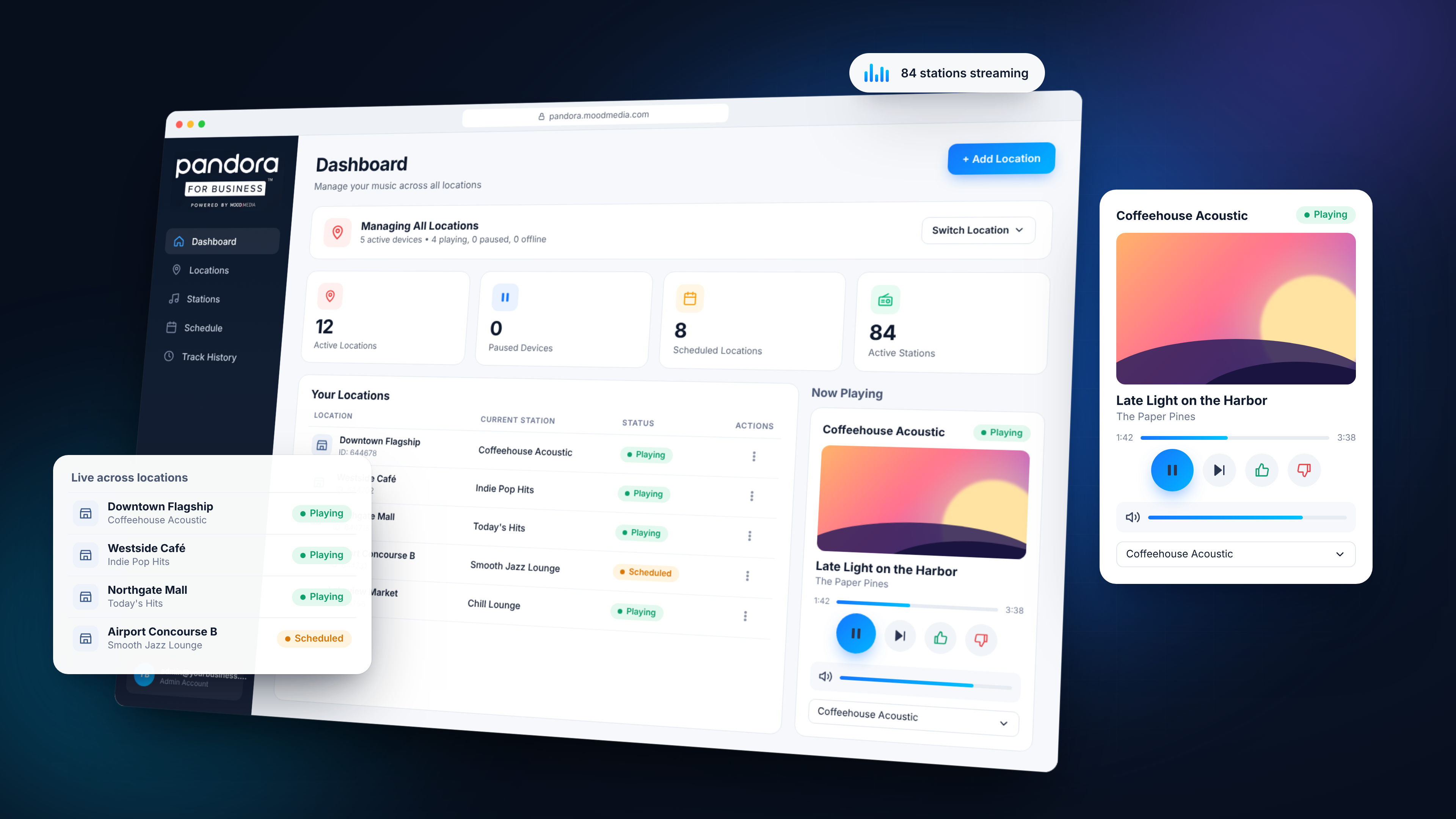
Everything you’d do in-store, now from anywhere.
Your command center for in-store music.
Know instantly which locations are playing, paused or offline, what’s on at each one, and take control without leaving the page.
- Summary cards for active, paused and scheduled locations and active stations
- Now Playing panel with album art, pause, skip and thumbs up / down
- Switch between locations in one click

Add a store in seconds. Spot problems before customers do.
Register a player with its Device ID, give it a name and icon, then filter every location by status so offline stores never go unnoticed.
- Filter by All, Active, Paused or Offline
- Live station and status on every location card
- Deactivate or remove a location from its actions menu

The Pandora library, curated for each location.
Build stations from any artist, album or track, browse genre collections by decade, and keep each store’s lineup fresh with shuffle.
- Search stations, artists, albums and tracks
- Browse genre stations by era — 50s through 2010s
- Shuffle across a location’s saved stations

Match the music to the moment, automatically.
Set the morning mood, pick up the pace at lunch and wind down in the evening. Dayparting switches stations on time, every day, with no one touching the player.
- Add a row per time slot: station plus start time
- Edit lock stops other admins overwriting your changes
- Save once and it applies to the player immediately

See what played. Shape what plays next.
Pull a log of recent tracks straight from the player, then like, dislike, rest an overplayed song or spin up a new station from a favorite.
- Track, artist and album for every recent song
- Sleep a song to give it a temporary break
- Create a station from any track or artist

Up and running in three steps.
Sign in
Go to pandora.moodmedia.com/control and log in with the email and password from your onboarding.
Add your locations
Select Add Location and enter each player’s Device ID — find it on the device’s settings screen. Name it and pick an icon if you like.
Pick music and schedule it
Add stations to each location, then set a Custom schedule so the right music plays at the right time.
Do I need to install anything?
No. The Web Controller runs in your web browser on a computer, tablet or phone. Just sign in at pandora.moodmedia.com/control.
Where do I find my Device ID?
It’s shown on your player’s device settings screen. Enter it when you select Add Location.
Can I manage several locations from one account?
Yes. Every location you add appears on your dashboard. Use Switch Location to choose which one you’re controlling.
What does “Offline” mean?
The player has lost its internet connection or power. Check the device and its network; it will show as Active again once it reconnects.
How often can I skip a song?
Once every 20 seconds per location.
What’s the difference between Dislike and Sleep Song?
Dislike stops that song playing again on that station at that location. Sleep Song gives it a temporary break — ideal for seasonal or overplayed tracks.
I forgot my password.
Select Forgot Password? on the sign-in screen and we’ll email you a confirmation code to set a new one. Check your spam folder if it doesn’t arrive within a few minutes.
Your music, every location, one place.
Already a customer? Log in now. New to Pandora for Business? Get started today.